Posts

Showing posts with the label PHP/MYSQL

PHP Ajax Login Validation Tutorial

Image
This post explains you about php login with ajax. In this example, first of all we will validate the user details using ajax library and showing the appropriate result. If user enter correct detail (ie:- admin/admin in this example)we will be redirected to the “index.php” and if you will try to directly access “index.php” means without entering the user details you will redirected to “login.php”. Download Link    Demo Link Sample database design for table name contact. This table contains id (primary key), name and age. CREATE TABLE IF NOT EXISTS `user` ( `id` int(11) NOT NULL AUTO_INCREMENT, `uname` varchar(50) NOT NULL `password` varchar(50) NOT NULL, PRIMARY KEY (`id`) ) dbConnect.inc.php Contains database connectivity code $mysql_db_hostname = "Host name"; $mysql_db_user = "UserName"; $mysql_db_password = "Password"; $mysql_db_database = "Database Name"; $con = mysql_connect($mysql_db_hostname, $mysql_db_user, ...
basic php mysql login script without page reload

insert.php <?php     define('HOST','localhost');     define('USERNAME', 'root');     define('PASSWORD','');     define('DB','mydba');     session_start();     $con = mysqli_connect(HOST,USERNAME,PASSWORD,DB);         $username = $_POST['username'];     $pass = $_POST['password'];         //$_SESSION["username"] = $username;                 //$sql = "select * from users where username='$username' && password='$pass'";         //if(mysqli_query($con, $sql)){         //echo 'success';         //echo "   username is " . $_SESSION["username"] . ".";     //}         $sql="SELECT * FROM users WH...

PHP Document Expired This document is no longer available

If the 'Back' button is pressed on the browser, I get the following error: Document Expired This document is no longer available .     Add this in the start of PHP codes : ini_set ( 'session.cache_limiter' , 'public' ); session_cache_limiter ( false );  

MySQL query based on user input

  To save from SQL injection attack, use: 1. $search_query = mysql_real_escape_string ( $_POST [ 'blahblah' ]); $query = "SELECT name, age FROM people WHERE uid = '" . $search_query . "' LIMIT 0 , 1" ;   2. $search_query = mysqli_real_escape_string($_POST['code']); $sql = "select * from user where code='$search_query'";

rewrite url in htaccess file

# Turn on the rewrite engine Options +FollowSymlinks RewriteEngine on # Request routing RewriteRule ^([a-zA-Z0-9_-]+)/?$ categorysearch.php?c_category=$1 # Request routing RewriteRule ^([A-Za-z0-9_-]+)/?$ subcategorysearch.php?c_subcategory=$1

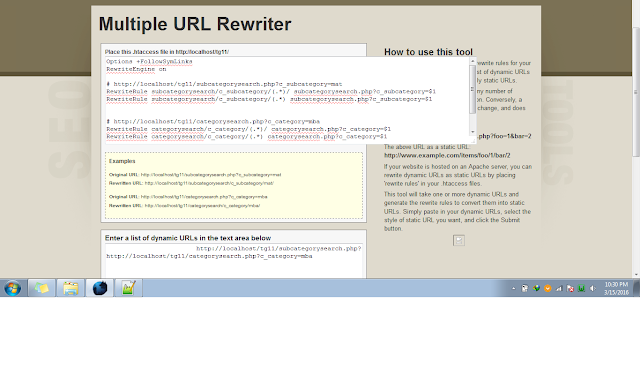
rewrite multiple urls in one htaccess

Image
http://tools.seomoves.org/rewriter/

php mysql retrieve and display data based on id or name

db1.php  <?php $servername="localhost"; $username="root"; $password=""; $database="tuts_rest"; //create connection$ $conn=new mysqli($servername, $username, $password, $database); //check connection if ($conn->connect_error) {     die("connection failed: ".$conn->connect_error); }     session_start(); ?> based on id  <?php include_once('includes/db1.php'); //$query = mysqli_query($conn,"select * from users"); //while ($row = mysqli_fetch_array($query)) { //echo "<tr><td><a href=details.php?id=$row[ID]>$row[name]</a></td><td>$row[email]</td></tr>"; //echo "<br />"; //} if (isset($_GET['ID'])) { $name = $_GET['ID']; $query1 = mysqli_query($conn, "select * from users where ID=$id"); while ($row1 = mysqli_fetch_array($query1)) { ?> <td><?php echo $row1['nam...

PHP MySQL Insert Into Database Without Refreshing Page

Image
Hello friends, in this PHP MySQL Insert into Database tutorial we will use jQuery AJAX method to insert values in our MySQL database without refreshing our web page. So lets begin. What you need before starting with PHP MySQL Insert Tutorial? WAMP / XAMPP server (I will be using wamp) Notepad++ (notepad is also ok) Little knowledge of PHP, SQL and JavaScript Creating Database First we will create a database Go to phpmyadmin (localhost/phpmyadmin) Create a database Create a table inside the database named users Creating Database I have created a table name users. In users I have three columns (id, username and password) as you can see above. Id is primary key with an auto increment. So we will insert only username and password with our html form. Creating HTML Form to Insert Values in Database Now we will create our html form. You can use the below html code to create your form. PHP MySQL Insert Tutorial Insert...

How do I link back out of a folder using the a-href tag

You can move up a directory by using ../ before your html document. So if home.html is up one directory, you could do: <a href="../home.html">bla</a> Try setting your link to be your site root as so; note the / in front of home.html : <a href = "/home.html" > bla </a>   Or if you know the path is definitely one directory down then just explicitly tell it to go down 1 directory; note the ../ in front of the home.html . <a href = "../home.html" > bla </a>

Script For Login, Logout and View Using PHP, MySQL and Bootstrap

Image
I am assuming here that you are familiar with HTML and CSS. I have commented the code with the necessary information in the major part of the code. So you can understand easily. I have also attached the source code so you can download it and use it. Let's start. Note: I have updating this article on my personal blog. The following are the points we will be learn in this article: Creating Database in phpmyadmin. Create connection with MySQL database. Insert, delete and view data from MySQL database. Some Bootstrap components. Sessions in PHP. Files and IDE: Registration Login Logout Welcome Admin_login View_users Db_conection Delete.php I am using PHPStorm for the coding and Bootstrap framework for front end development. Create Database: Create Tables: Create columns in Users table: Crate Admin Table: Create Admin Columns: Registration.php: <html>   <head lang= "en" >      ...